HMC5883L电子罗盘模块工作原理_应用电路_数据手册
HMC5883L是霍尼韦尔采用各向异性磁阻技术开发的磁力计模块。它是一个多芯片模块,充当数字罗盘(电子罗盘模块),用于确定方向并测量沿X、Y和Z轴的磁场的大小和方向。HMC5883L模块将磁场转换为3轴引脚上的差分电压输出。
与人类不同,机器人和无人机等无人机器无法感知向哪个方向移动,所以它们需要一个传感器来识别方向,这就是磁力计发挥的功能。它们感知磁场并基于该磁场,告诉集成该磁力计设备的方向。因此,可以使用HMC5883L来确定物体的方向。
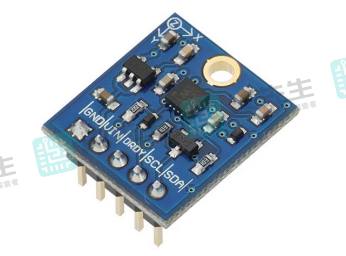
IC引脚配置
HMC5883L磁力计模块由XC6206P332MR IC等元器件组成,首先来看看该IC的引脚配置,然后看看该模块的引脚排列。
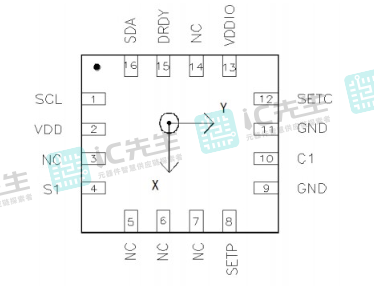
引脚配置说明:
Pin3、5、6、7和14是NC引脚,它们没有任何功能,这就是未连接的原因。
Pin1和Pin16是I2C接口的通信引脚,具体为:
- SCL——Pin1
- SDA——Pin16
SCL是主/从时钟输入,它从主设备接收时钟信号。当我们将磁力计IC与微控制器连接时,它充当从属设备。因此,微控制器向IC提供时钟信号。SDA是串行数据引脚。
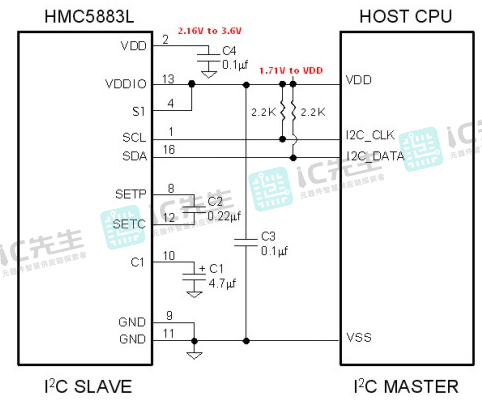
Pin2为电源引脚。传感器工作需要2.16V至3.6V范围内的电压,它为内部操作提供动力。Pin9和Pin11为接地引脚。
- Pin4是S1引脚,将此引脚连接到VDDIO。
- Pin8是设置/重置带正输入引脚,它消除了传感器中存储的过去的磁性。
- Pin10是储能电容器的引脚,在此引脚上连接一个4.7µF储能电容器。
- Pin12 SETC是设置/重置带驱动器侧的连接。
- Pin13 VDDIO为IO接口供电,它应该是1.71V到VDD。
- Pin15是数据就绪中断引脚,指示数据何时准备就绪。
模块引脚配置
如下图所示,XC6206P332MR IC有很多管脚,我们需要使用外部元件来使其工作。幸运的是,市场上可以买到包含所有必需组件的模块。此图显示了磁力计模块的引出线。
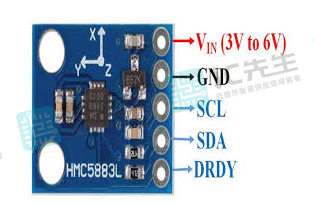
从这个引脚图可以看出,该模块易于使用且引脚数较少。所有管脚的功能都是一样的。SCL和SDA引脚用于连接微控制器以接收来自磁力计的3轴数据。
功能特点
- 以3V至6V的直流电压工作。
- 支持I2C通信协议。
- 该传感器具有3轴磁阻传感器、ASIC、12位ADC和带驱动电路。
- HMC2883L可测量 -8至+8高斯范围内的磁场强度,精度为1-2度。
- 最大数据输出速率为160Hz。
工作原理
下图显示了HMC5883L传感器模块的两个参考设计,以了解其工作原理。在单电源设计中,在引脚VDD和VDDIO上应用相同的电源电压。在双电源模式下,在两个引脚上应用了单独的电源。VDD为IC的内部操作提供电源,而VDDIO为I2C接口提供电源以实现通信。两个电路中的所有其它连接都相同。它有两种操作模式标准和快速模式。因此,连接上拉电阻来支持这些模式。
1、单电源设计电路
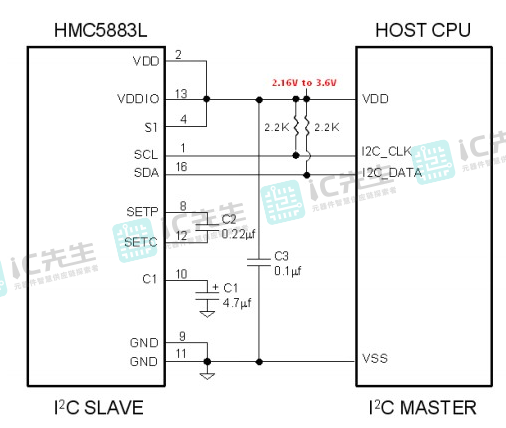
2、双电源设计电路
读取步骤
以下是开始初始化和读取指南针模块值的基本步骤。该模块配备4.7 kΩ SDA线上的上拉电阻器和SCL线上的2.2K电阻器,不需要任何外部硬件进行操作。电路示意图如下所示:
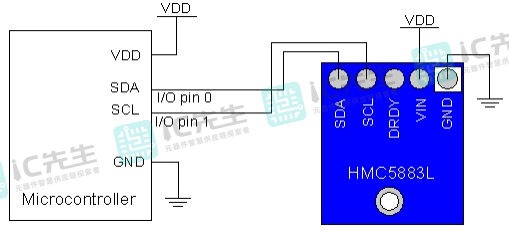
- 在主电源关闭的情况下,在指南针模块和微控制器之间进行正确的连接,如上所示。连接到VIN引脚的电压应与为与设备通信的微控制器供电的电压相同。
- 打开设备电源,加载BASIC Stamp或Propeller微控制器样本代码。
与Arduino Uno接口连接
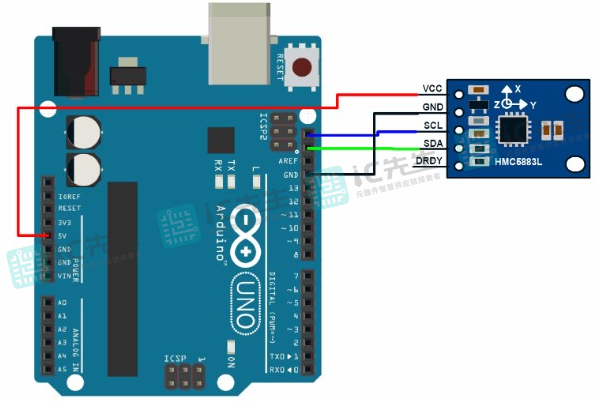
HMC5883L有一个分线板,其中包含额外的电路,使其与其它微控制器兼容。你可以直接将此分线板与Arduino Uno连接,无需额外的组件。连接很简单,将Vcc连接到+5V并接地到Arduino的接地引脚。将通信引脚SCL和SDA连接到模拟引脚5和4或Arduino。
HMC5883 Arduino库
使用James Sleeman的HMC5883L库可以非常轻松地对该HMC5883模块进行编程。首先,转到此链接并下载库。
之后转到Arduino库管理器并添加HMC5883库。或者可以提取下载的文件夹并将此文件粘贴到Arduino库文件夹中。
与Arduino的连接图
按照下面所示连接磁力计模块和Arduino Uno。
- GY-273指南针模块 -> Arduino
- VCC -> VCC(见下面的注释)
- 接地 -> 接地
- SCL -> A5/SCL(使用Arduino Mega上的引脚21)
- SDA -> A4/SDA(在Arduino Mega上使用引脚20)
- DRDY -> 未连接(在本例中)
Arduino代码
此代码显示HMC5883L模块Arduino库的功能。
#include <Arduino.h>

// PLEASE NOTE!
// The Arduino IDE is a bit braindead, even though we include Wire.h here, it does nothing
// you must include Wire.h in your main sketch, the Arduino IDE will not include Wire
// in the build process otherwise.
#include <Wire.h>
#include "HMC5883L_Simple.h"

HMC5883L_Simple::HMC5883L_Simple()
{
  declination_offset_radians = 0;
  mode = COMPASS_SINGLE | COMPASS_SCALE_130 | COMPASS_HORIZONTAL_X_NORTH;
  i2c_address = COMPASS_I2C_ADDRESS;  // NB: The HMC5883L does not appear to be able to have any different address.
                                      //     so this is a bit moot.
}

/** Set declination in degrees, minutes and direction (E/W)
 *   See http://www.magnetic-declination.com/
 */

void HMC5883L_Simple::SetDeclination( int declination_degs , int declination_mins, char declination_dir )
{
  // Convert declination to decimal degrees
  switch(declination_dir)
  {
    // North and East are positive
    case 'E':
      declination_offset_radians = ( declination_degs + (1/60 * declination_mins)) * (M_PI / 180);
      break;

    // South and West are negative
    case 'W':
      declination_offset_radians =  0 - (( declination_degs + (1/60 * declination_mins) ) * (M_PI / 180));
      break;
  }
}

/** Set the sampling mode to one of COMPASS_CONTINUOUS or COMPASS_SINGLE
 */

void HMC5883L_Simple::SetSamplingMode( uint16_t sampling_mode )
{
  // Mode is the bits marked M in mode
  //    xxxxxxxxxxxSSSMM
  mode = (mode & ~0x03) | (sampling_mode & 0x03);

  Write(COMPASS_MODE_REGISTER, mode & 0x03);
}

/** Set the scale to one of COMPASS_SCALE_088 through COMPASS_SCALE_810
 * Higher scales are less sensitive and less noisy
 * Lower scales are more sensitive and more noisy
 */

void HMC5883L_Simple::SetScale( uint16_t scale )
{
  // Scale is the bits marked S in mode
  //    xxxxxxxxxxxSSSMM
  mode = (mode & ~0x1C) | (scale & 0x1C);

  Write(COMPASS_CONFIG_REGISTER_B, (( mode >> 2 ) & 0x07) << 5);
}

/** Set the orientation to one of COMPASS_HORIZONTAL_X_NORTH
 * through COMPASS_VERTICAL_Y_WEST
 *
 */

void HMC5883L_Simple::SetOrientation( uint16_t orientation )
{
  // Orientation is the bits marked XXXYYYZZZ in mode
  //    xxXXXYYYZZZxxxxx
  mode = (mode & ~0x3FE0) | (orientation & 0x3FE0);
}

/** Get the heading of the compass in degrees. */
float HMC5883L_Simple::GetHeadingDegrees()
{
  // Obtain a sample of the magnetic axes
  MagnetometerSample sample = ReadAxes();

  float heading;

  // Determine which of the Axes to use for North and West (when compass is "pointing" north)
  float mag_north, mag_west;

  // Z = bits 0-2
  switch((mode >> 5) & 0x07 )
  {
    case COMPASS_NORTH: mag_north = sample.Z; break;
    case COMPASS_SOUTH: mag_north = 0-sample.Z; break;
    case COMPASS_WEST:  mag_west  = sample.Z; break;
    case COMPASS_EAST:  mag_west  = 0-sample.Z; break;

    // Don't care
    case COMPASS_UP:
    case COMPASS_DOWN:
     break;
  }

  // Y = bits 3 - 5
  switch(((mode >> 5) >> 3) & 0x07 )
  {
    case COMPASS_NORTH: mag_north = sample.Y;  break;
    case COMPASS_SOUTH: mag_north = 0-sample.Y; ;  break;
    case COMPASS_WEST:  mag_west  = sample.Y;  break;
    case COMPASS_EAST:  mag_west  = 0-sample.Y;  break;

    // Don't care
    case COMPASS_UP:
    case COMPASS_DOWN:
     break;
  }

  // X = bits 6 - 8
  switch(((mode >> 5) >> 6) & 0x07 )
  {
    case COMPASS_NORTH: mag_north = sample.X; break;
    case COMPASS_SOUTH: mag_north = 0-sample.X; break;
    case COMPASS_WEST:  mag_west  = sample.X; break;
    case COMPASS_EAST:  mag_west  = 0-sample.X; break;

    // Don't care
    case COMPASS_UP:
    case COMPASS_DOWN:
     break;
  }

  // calculate heading from the north and west magnetic axes
  heading = atan2(mag_west, mag_north);

  // Adjust the heading by the declination
  heading += declination_offset_radians;

  // Correct for when signs are reversed.
  if(heading < 0)
    heading += 2*M_PI;

  // Check for wrap due to addition of declination.
  if(heading > 2*M_PI)
    heading -= 2*M_PI;

  // Convert radians to degrees for readability.
  return heading * 180/M_PI;
}

/** Read the axes from the magnetometer.
 * In SINGLE mode we take a sample.  In CONTINUOUS mode we
 * just grab the most recent result in the registers.
 */

HMC5883L_Simple::MagnetometerSample HMC5883L_Simple::ReadAxes()
{
  if(mode & COMPASS_SINGLE)
  {
    Write(COMPASS_MODE_REGISTER, (uint8_t)( mode & 0x03 ));
    delay(66); // We could listen to the data ready pin instead of waiting.
  }

  uint8_t buffer[6];
  Read(COMPASS_DATA_REGISTER, buffer, 6);

  MagnetometerSample sample;

  // NOTE:
  // The registers are in the order X Z Y  (page 11 of datasheet)
  // the datasheet when it describes the registers details then in order X Y Z (page 15)
  // stupid datasheet writers
  sample.X = (buffer[0] << 8) | buffer[1];
  sample.Z = (buffer[2] << 8) | buffer[3];
  sample.Y = (buffer[4] << 8) | buffer[5];

  return sample;
}

/** Write data to the compass by I2C */
void HMC5883L_Simple::Write(uint8_t register_address, uint8_t data)
{
  Wire.beginTransmission(i2c_address);
  Wire.write(register_address);
  Wire.write(data);
  Wire.endTransmission();
}

/** Read data from the compass by I2C
 */
uint8_t HMC5883L_Simple::Read(uint8_t register_address, uint8_t buffer[], uint8_t length)
{
  // Write the register address that we will begin the read from, this
  // has the effect of "seeking" to that register
  Wire.beginTransmission(i2c_address);
  Wire.write(register_address);
  Wire.endTransmission();

  // Read the data starting at that register we seeked
  Wire.requestFrom(i2c_address, length);

  if(Wire.available() == length)
  {
    for(uint8_t i = 0; i < length; i++)
    {
      buffer[i] = Wire.read();
    }

    return length;
  }

  return 0;
}
示例代码
此示例草图显示了Arduino串行监视器上HMC5883L三轴磁力计的航向读数。
#include <Arduino.h>
#include <Wire.h>
#include <HMC5883L_Simple.h>

// Create a compass
HMC5883L_Simple Compass;

void setup()
{
  Serial.begin(9600);
  Wire.begin();

  // Magnetic Declination is the correction applied according to your present location
  // in order to get True North from Magnetic North, it varies from place to place.
  //
  // The declination for your area can be obtained from http://www.magnetic-declination.com/
  // Take the "Magnetic Declination" line that it gives you in the information,
  //
  // Examples:
  //   Christchurch, 23° 35' EAST
  //   Wellington  , 22° 14' EAST
  //   Dunedin     , 25° 8'  EAST
  //   Auckland    , 19° 30' EAST
  //
  Compass.SetDeclination(23, 35, 'E');

  // The device can operate in SINGLE (default) or CONTINUOUS mode
  //   SINGLE simply means that it takes a reading when you request one
  //   CONTINUOUS means that it is always taking readings
  // for most purposes, SINGLE is what you want.
  Compass.SetSamplingMode(COMPASS_SINGLE);

  // The scale can be adjusted to one of several levels, you can probably leave it at the default.
  // Essentially this controls how sensitive the device is.
  //   Options are 088, 130 (default), 190, 250, 400, 470, 560, 810
  // Specify the option as COMPASS_SCALE_xxx
  // Lower values are more sensitive, higher values are less sensitive.
  // The default is probably just fine, it works for me.  If it seems very noisy
  // (jumping around), incrase the scale to a higher one.
  Compass.SetScale(COMPASS_SCALE_130);

  // The compass has 3 axes, but two of them must be close to parallel to the earth's surface to read it,
  // (we do not compensate for tilt, that's a complicated thing) - just like a real compass has a floating
  // needle you can imagine the digital compass does too.
  //
  // To allow you to mount the compass in different ways you can specify the orientation:
  //   COMPASS_HORIZONTAL_X_NORTH (default), the compass is oriented horizontally, top-side up. when pointing North the X silkscreen arrow will point North
  //   COMPASS_HORIZONTAL_Y_NORTH, top-side up, Y is the needle,when pointing North the Y silkscreen arrow will point North
  //   COMPASS_VERTICAL_X_EAST,    vertically mounted (tall) looking at the top side, when facing North the X silkscreen arrow will point East
  //   COMPASS_VERTICAL_Y_WEST,    vertically mounted (wide) looking at the top side, when facing North the Y silkscreen arrow will point West
  Compass.SetOrientation(COMPASS_HORIZONTAL_X_NORTH);

}

// Our main program loop.
void loop()
{
   float heading = Compass.GetHeadingDegrees();

   Serial.print("Heading: \t");
   Serial.println( heading );
   delay(1000);
}
主要应用
HMC5883L是一款价格低廉且易于获得的小型传感器,它的数字接口允许它与其它微控制器一起使用。甚至可以将它与普通IC连接。与业内其它磁力计相比,这些传感器是最可靠、最灵敏的传感器。
当然,你可以在应用中使用此传感器来测量磁场的强度和大小,还可以测量材料的磁化强度。如果正在寻找可以通过提供精确测量来执行上述功能的磁力计,那么此传感器最适合此目的。一些比较常见的应用如下:
- 基于GPS无线电话
- 电脑游戏
- 无线指针
- 运动手表
- 便携式GPS接收器
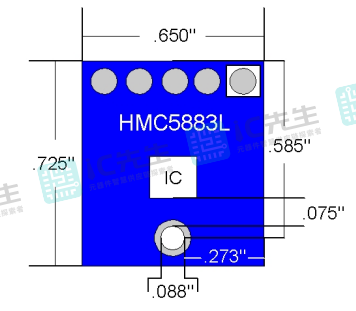
封装设计参数
总结
HMC5883L是霍尔磁敏感元件,用于测量磁场强度和方向。它是一种数字式三轴磁力计,通过霍尔效应测量磁场强度和方向,具有可调的分辨率和量程,并通过I2C接口与其它设备通信。HMC5883L在导航、定位和姿态测量等领域具有广泛应用。